Credits & top-ups
When Harriet supplies the model keys, LLM usage is billed against a prepaid credit balance. This page covers buying credits, automatic top-up, and what happens when the balance runs out.
How managed billing works
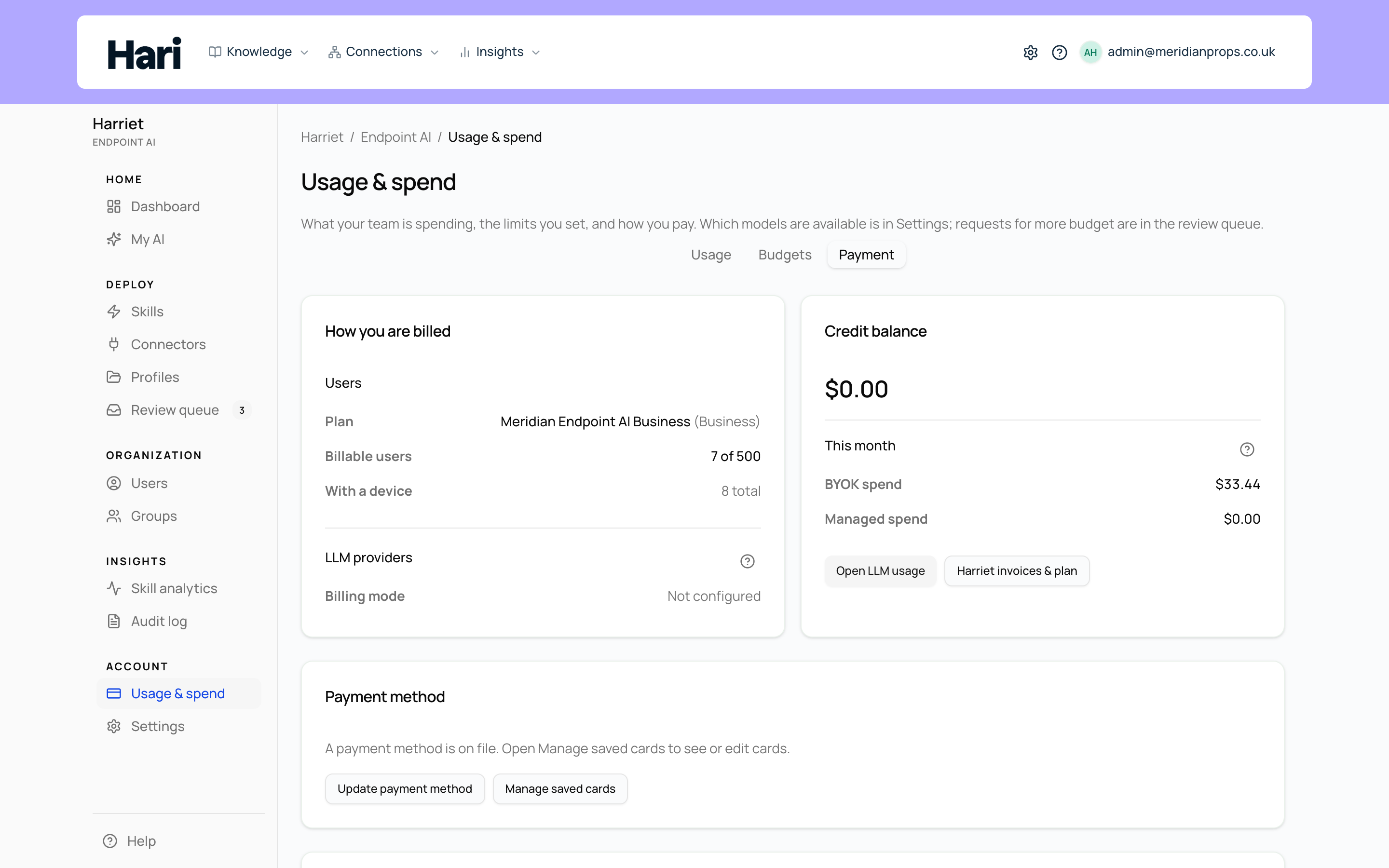
Your organization has one credit balance in USD, shown on the Billing tab's Credit balance card. Every managed call through the LLM proxy debits it at the provider's list price plus a 20% managed-usage markup. Calls made with your own keys never touch the balance — the provider bills you directly, and the Billing tab shows the two streams side by side under This month as BYOK spend and Managed spend. See Setting up BYOK for how each provider's billing mode is decided.
New organizations start with a one-time promotional grant of $20 in managed LLM credit, so people can try managed models before a card is on file.
Buying credits
Credits are bought as packs of $25, $50, or $100 through Stripe checkout. The checkout page collects payment, and the credit lands in your balance when the session completes. Each purchase appears in the ledger with a Receipt link.
Tax runs through Stripe Tax. Credit is tax-exclusive: where tax applies you pay the pack price plus tax at checkout, and your balance is credited with the pack price only.
Automatic top-up
Rather than buying packs by hand, let Harriet refill the balance. When a card is on file, top-up is turned on by default so managed usage can keep running. Configure it on the Billing tab's Automatic top-up card:
- Add a payment method. The form is disabled until a card is saved. Use Add payment method on the Payment method card above it.
- Set "Top up when balance falls to". When the balance drops to this dollar threshold, Harriet charges the saved card. The default threshold is $5.
- Set "Amount per top-up". How much each automatic purchase adds. Allowed values: 25, 50, or 100.
- Optionally set "Monthly cap for auto top-ups (optional)". Leave it empty for no cap, or enter a dollar limit on how much can be auto-purchased per month. The form shows "Auto top-ups purchased this month" so you can see where you stand against the cap.
- Save. Select Save auto top-up. Turning the switch off stops the charges; your current balance is unchanged.
The transactions ledger
The Credit purchases & activity table at the bottom of the Billing tab lists recent ledger entries with Date, Kind, Amount, Balance after, and Receipt columns. Purchases carry a Stripe receipt link; the promotional grant and usage debits appear as their own kinds. For per-user and per-model spend, select Open LLM usage to jump to usage analytics.
When the balance hits zero
Managed calls require a positive balance. Before refusing a request, the proxy first attempts an automatic top-up if it is enabled — so with a card on file, people usually never notice. If the balance still cannot cover the call, the request is refused with a billing error the desktop app shows verbatim, such as insufficient_credits, payment_method_required (top-up is on but no card is saved), or monthly_auto_topup_cap_reached. BYOK traffic is unaffected. See error codes for the full list and fixes.
Credits fund usage; they don't limit it. To cap what a person, team, or the whole organization can spend, set budgets.