The review queue
The review queue lists every skill and MCP connector that is not yet approved for deployment. Nothing reaches an enrolled device until a reviewer approves it here.
What lands in the queue
The queue aggregates unapproved items from every authoring path:
- Skills submitted from the editor. The skill creation wizard offers Save and submit for review, which creates a draft and submits it to the shared queue. See Creating skills.
- Skilify submissions. Packages built on a device or in a browser session with the Skilify flow always arrive as submitted; there is no auto-publish path, even for account owners.
- Session distiller packages. Skills captured from external AI sessions with the Session distiller workflow are uploaded straight into review.
- Proposed updates to approved skills. On an approved skill, Propose update for review creates a draft clone that goes through the queue while the live version keeps running. See The review workflow.
- MCP connectors. Connectors that are not yet approved appear alongside skills, so one screen covers everything awaiting a decision. See Installing connectors.
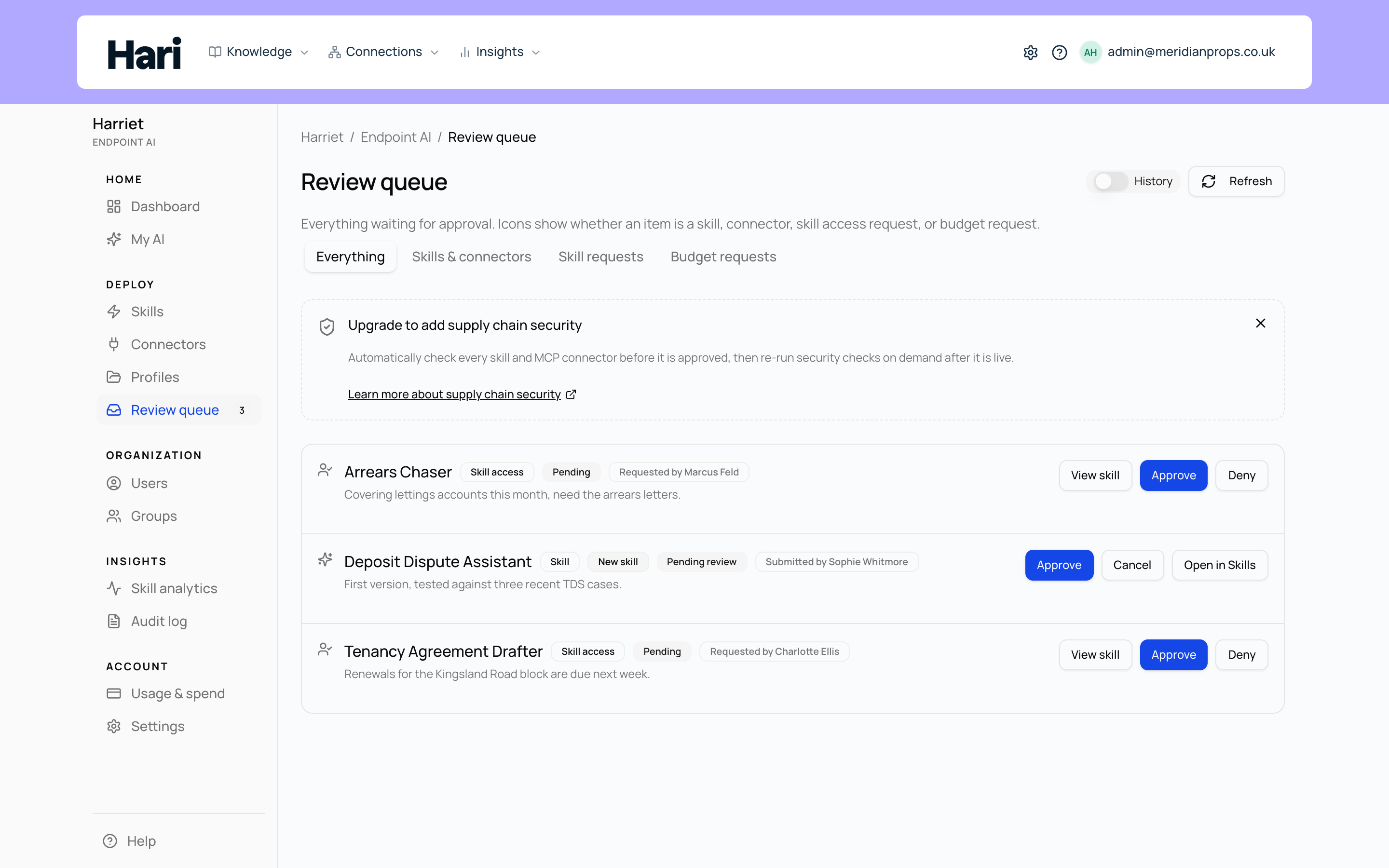
Reading a queue item
Each row shows the item's name, a Skill or MCP badge, an optional proposal-type badge, the current status, and when it was submitted (hover the date for the exact time). For a new skill, the row also shows the submitter's name, email, and department when those are set, the full rationale they left, and any suggested profiles or management group (or a request to create one by name). For proposed updates, a diff summary lists which files or fields changed, so you can see the size of a change before opening it. Use Refresh to reload the list.
The queue is newest first. When more than one update request is open for the same skill, each of those rows says so and links to the skill. Approve the oldest first: approving an update makes it the live skill, so the remaining requests are then measured against that newer version and may need a merge before they can be approved. Harriet flags those and offers a merged version to review, so nothing is silently overwritten.
People cannot stack requests on themselves: submitting a second update to a skill replaces their own pending request rather than adding to the queue. Two rows for one skill therefore mean two different people.
Reviewing an item
- Open the item. For a skill, select Open in Skills to see the full definition in the editor. For a connector, select Configure to open its integration settings.
- Write reviewer feedback. The feedback field is optional for approve, and required to request changes or reject.
- Decide. On an update proposal or connector, Approve is the main action. On a new skill, Approve opens a confirmation so you can confirm or change the suggested profiles, management group, and whether to assign the skill to the submitter. You can create a named profile or group from that dialog when you have permission. Request changes, Reject, and related decisions (including Approve as new skill) are in the overflow menu. Requesting changes returns the item to its author, who can edit and resubmit. Submitted skills can also be approved directly from the queue row.
Authors can pull back their own submission with Withdraw at any point before a decision. Account owners and people with the org-wide Manage skills role may approve, reject, or request changes on their own submissions; a dedicated reviewer without that role needs a different approver.
Statuses
| Status | Meaning |
|---|---|
| Draft | Being written. Editable by the author; not visible to reviewers as work to do. |
| Submitted | Waiting for a reviewer. The definition is locked until a decision is made or the author withdraws. |
| Changes requested | Returned to the author with feedback. Editable again; resubmit when ready. |
| Approved | Cleared for deployment. |
| Rejected | Declined with a reviewer note. |
| Withdrawn | Pulled back by the author before a decision. |
| Archived | Retired from the queue. |
What approval unlocks
Only approved skills are provisioned: profile syncs and direct assignments deploy approved definitions, and approved connectors expose their tools to skills. Approving a new skill can put it on the profiles you confirmed in the same step, so those people receive it without a separate hunt. Enrolled devices check in every five minutes, so an approval typically reaches the fleet within one sync cycle. Until then, the item exists in Harriet but does nothing on any device.
Approving a proposed update replaces the live skill with the reviewed clone. The audience assigned to the skill does not change, so there is nothing to reassign after approval.
For the author's side of this flow, see The review workflow. For the wider control story, see Skill governance.