Review workflow
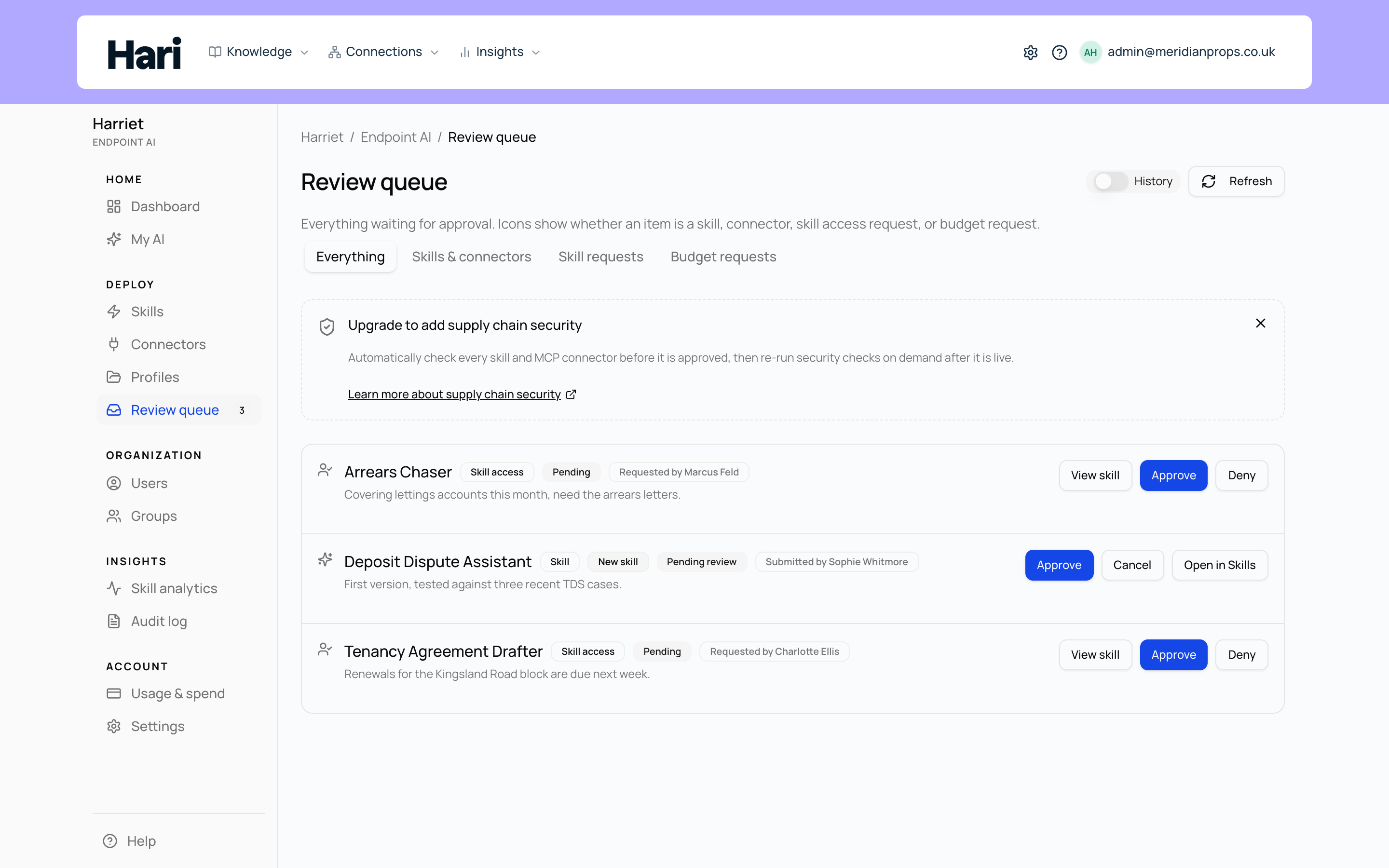
Every skill carries a review status, and only approved skills run. The review workflow is how a draft — authored in the wizard, submitted by Skilify, or distilled from a Claude session — becomes something Harriet will deploy.
Statuses
| Status | Meaning |
|---|---|
| Draft | Being authored. Editable by the author; not visible to runtime. |
| Submitted | In the review queue, waiting for a reviewer to act. |
| Changes requested | A reviewer sent it back with notes. Editable again; resubmit when ready. |
| Approved | Live. Usable in chat and desktop, and deployable to profiles and devices. |
| Rejected | A reviewer declined it, with notes. |
| Withdrawn | The submitter pulled it back before a decision. |
| Archived | Retired from the workflow. |
A skill is editable in Draft and Changes requested, and reviewable in Submitted. The submitter can Withdraw their own skill while it is in Draft, Submitted, or Changes requested.
Who reviews
Account owners and people with the skill review permission act on submissions; see roles and permissions. A reviewer opens the submission and chooses Approve. Request changes, Reject, and (for an update proposal) Approve as new skill are in the overflow menu next to it. Requesting changes and rejecting both require notes back to the author. If supply-chain review scores the item Critical, Approve is disabled until the findings are resolved; an account owner or super admin can still choose Approve with override from that menu, with a documented reason in the feedback field.
People with the organization-wide Manage skills role may approve, reject, or request changes on their own submitted skills, the same as owners. Dedicated reviewers without that role still need a different approver, so if your policy forbids self-approval, grant review rights without the manage-skills role.
What approval unlocks
Approval is the gate to runtime: a skill "must be approved before it can be used in chat, desktop, or deployment." Once Approved, the skill can be assigned to profiles, teams, and people, and provisioned to enrolled devices (see How skills reach people). Approval alone grants nothing to anyone; assignment still decides who receives it.
You can add a not-yet-approved skill to a profile ahead of time. Its row on the profile shows an Awaiting approval chip, and the skill is not provisioned to that profile's people and devices until it clears review.
Updating an approved skill
Approved skills offer two update paths. Save changes (live) edits the live skill immediately, when your role allows. Propose update for review creates a draft copy of the skill; the copy goes through the same Submitted → Approved cycle and stays out of runtime until a reviewer approves it; use it when another person must sign off.
While reviewing a proposed update, the Changes vs live skill view compares the submission to the approved skill that is currently live, setting by setting and file by file, so the reviewer sees exactly what would change.
Replacing an update request you already sent
You can have one update request open per skill at a time. If you keep improving the skill after sending one, submitting again offers to replace the request you already have: your earlier request is withdrawn and the newer version goes to reviewers in its place. You will see this in Harriet Desktop as Replace your pending change request, and in the skills editor as a prompt to replace it or keep the one you have.
This only ever affects your own requests. If a colleague has a request open for the same skill, yours is added alongside theirs — neither is withdrawn, and a reviewer decides on both.
Harriet never sends a skill for review on its own. Whether you are working in Harriet Desktop, in chat, or through the session distiller, you are asked to confirm each submission — including one that would replace a request you already sent.
Connectors go through the same review gate: only connectors already approved for use in live skills can be attached to a skill; others stay in review until a reviewer approves them.