Profiles
Profiles are bundles of skills you can assign to teams or individuals. Configure a profile once, assign it to a team, and every person on that team receives the same skills and settings on their devices.
Why profiles exist
Assigning skills one by one, person by person, does not scale past a handful of people. A profile lets you define a role's configuration in one place and apply it to many people at once. When you add a skill to the profile later, everyone assigned the profile picks it up on their next sync, with no further admin work.
Profiles are also the only route for teams: you assign a profile to a team, not individual skills. Direct skill assignments exist too, but they are per-person only: a direct skill assignment to a team is rejected, which keeps team-wide capability changes flowing through profiles where they are visible and reviewable in one place.
What a profile carries
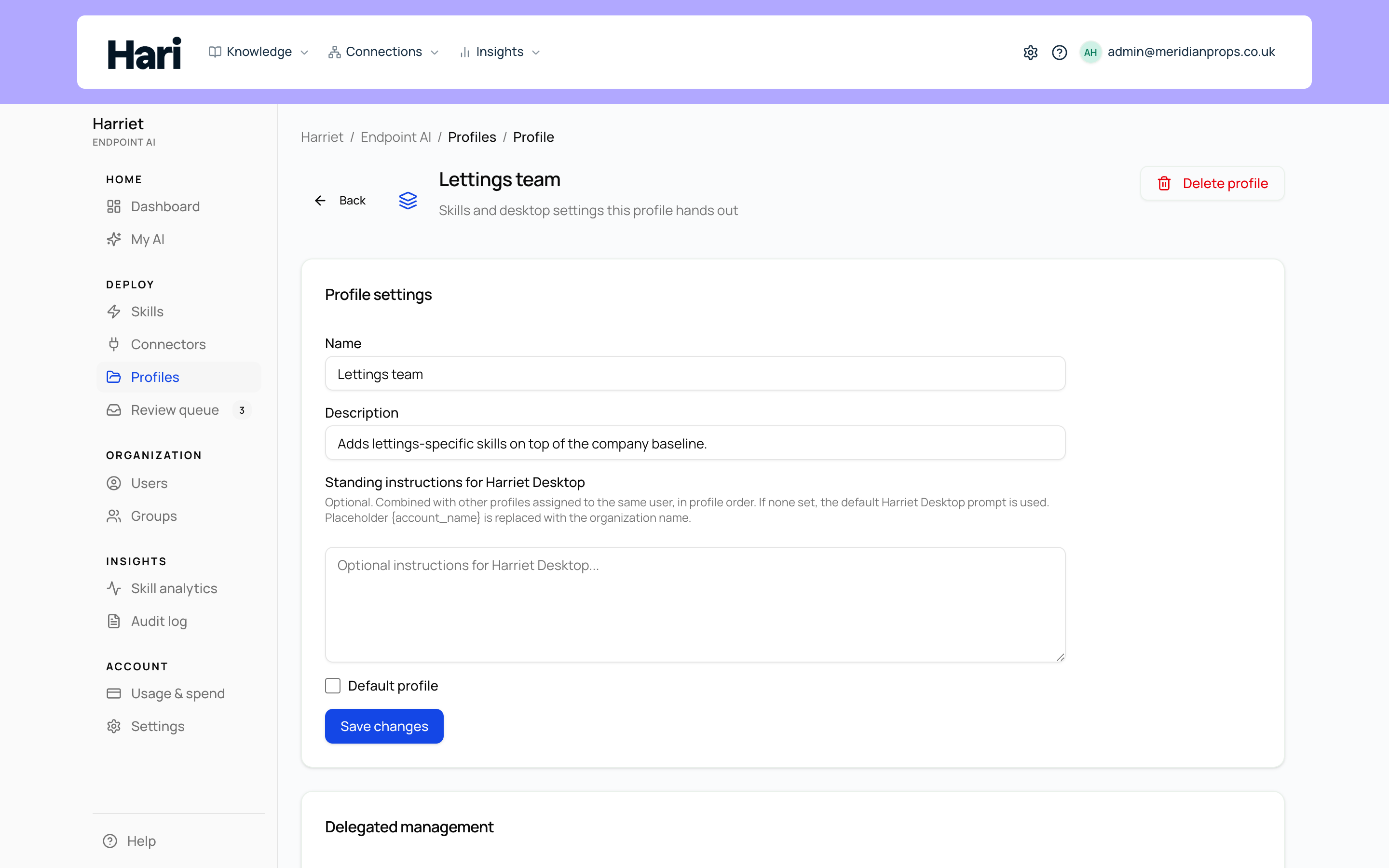
Open Manage → Profiles and select a profile to see everything it contains:
- Profile settings: the Name, an optional Description, and the Default profile checkbox that marks it as the organization baseline. See The default profile.
- Harriet Desktop global rules (AGENTS.md): optional org-wide instructions written into Harriet Desktop for everyone on the profile. See Global rules (AGENTS.md).
- Skills in profile: an ordered list of skills. Add skills with the Add skill picker; remove them from the list. A skill still in review shows an Awaiting approval chip: it stays in the profile for editing and assignment, but is not pushed to desktops until approved.
- Desktop MCP transport: optional per-connector overrides between Proxied (via Harriet) and Direct. See Connector transport.
- Delegated management: security groups whose members may edit this profile without a full admin role. See Delegated management.
How assignment works
The Who receives this profile card on the profile detail page lists the teams and people assigned to it. Use Add team or Add person to extend the list; each row can be removed again. Everyone listed gets the profile's skills and settings in addition to the organization default profile. The same assignments also appear in the global Assignments view, reachable from the Profiles screen with Open assignments.
Adding or removing recipients requires the Manage Harriet Endpoint AI permission. Delegated profile managers can edit a profile's contents but cannot change who receives it.
One person, several routes
A person's effective configuration is a merge, not a single assignment. Skills can reach them through the default profile, through profiles assigned to their teams, through profiles assigned to them personally, and through direct skill assignments. The person detail page in Teams and people shows this as Effective access — the merged result of default, direct, and team routes — so you can always see why someone has a skill.
Learn more
The baseline every person receives automatically, and why to keep it minimal.
Org-wide instructions written into Harriet Desktop for everyone on the profile.
Choose Proxied (via Harriet) or Direct per connector, and what each means.
Let a team lead curate a profile without a provisioner admin role.