Devices
A device is an enrolled Mac or Windows computer that Harriet configures and monitors. This page explains what enrollment gives you, how to read the Devices list, and the three ways a machine gets enrolled.
What an enrolled device is
When a computer enrolls, Harriet creates a device record with its own credentials and starts managing the AI configuration on that machine. The device checks in every five minutes, receives the configuration its profile and assignments define, applies it locally, and reports back. See How sync works for the full loop.
A device is usually linked to a person, so Harriet knows whose skills to provision and whose OAuth connections to use. Devices that are not linked yet show up in the needs-attention banner, and you fix them by linking with a code.
The Devices list
Open Devices in the Endpoint AI console to see every enrolled machine. The table has five columns: Device (hostname or device ID), Status, OS (type and version), User (the linked person, with a Link user shortcut when nobody is linked), and Last seen.
Two buttons sit above the table: Connect desktop app enrolls the computer you are sitting at, and Send invite emails an enrollment invite to a colleague. Both are covered in Enrolling a device.
When any device is unlinked or has not reported for a while, a warning banner appears above the list: "Needs attention: N devices unlinked or haven't reported recently." Click into a device to see which problem applies and what to do about it.
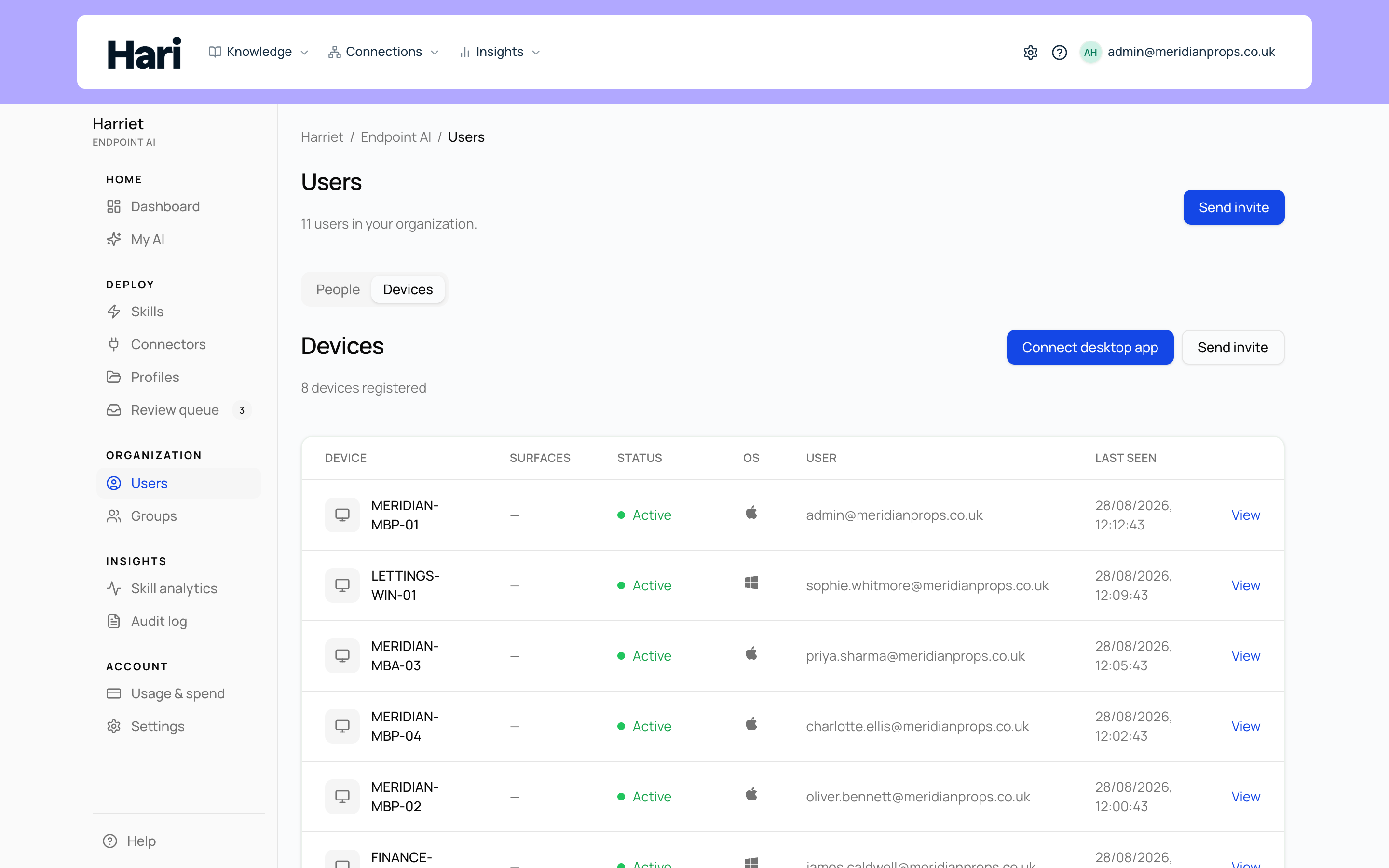
Device statuses
| Status | Meaning |
|---|---|
| Active | The device has checked in recently and is receiving configuration normally. |
| Inactive | The device has not reported for more than seven days (or has never checked in). Confirm the agent is running on the machine, or see Device not syncing. |
| Blocked | The device is still enrolled, but Harriet refuses its traffic: MCP proxy calls and LLM proxy requests from a blocked device fail authorization. |
| Pending wipe | A full removal is scheduled. On its next check-in the agent removes all Harriet-managed configuration from the machine. See Removing and wiping devices. |
| Wiped | The machine confirmed the wipe. The device disappears from the list, but its detail page stays available as a record of the removal (shown as Removed). |
Three ways a device gets enrolled
- Harriet Desktop sign-in. When someone installs Harriet Desktop and signs in with their Harriet account, the app enrolls the device itself. No separate agent install is needed.
- Enrollment invite. An admin sends a branded email from Devices or People. The recipient opens a secret enrollment link, downloads the desktop app or runs a connect command, and links the device. See Enrolling a device.
- MDM or terminal install. IT rolls out the background agent with Jamf, Kandji, Munki, or a Windows scheduled task, using an enrollment token and environment variables. See Deploying with MDM.
Employees can see their own devices and sync status on My AI → Your devices, without touching the admin console.